
If the Elonga app displays an incorrect or incomplete measurement, it is usually due to insufficient signal quality. To properly evaluate ANS (HRV) activity, the sensor needs enough high-quality data without significant fluctuations or artifacts.
1. What does “incorrect measurement” mean?
The sensor operates with high precision and filters out large fluctuations (artifacts).
If there are too many artifacts, the system does not have enough valid data to evaluate the measurement and marks it as incorrect.
This does not mean the sensor is damaged in most cases, the cause is easy to resolve.
2. Most common reasons for incorrect measurements
Insufficient measurement standardization
HRV measurement is sensitive to the body’s resting state. We recommend:
measure every morning or after the main sleep of the day,
measure lying down, in complete rest,
after putting on the sensor, stay still for about 1 minute,
do not move or speak during the measurement.
Even small movements can cause artifacts.
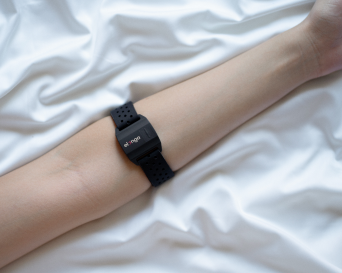
Incorrect placement or attachment of the sensor
Check that:
the strap is firm but comfortable,
the sensor is in full contact with the skin,
it is placed on the inner forearm,
the protective film on the underside is removed,
the battery is sufficiently charged.
If you see irregularities in the signal, try adjusting the position or tightening the strap.
Bluetooth signal interference
For stable data transmission:
avoid having other active Bluetooth devices nearby,
ensure your phone is not limiting Bluetooth due to power-saving modes,
keep the Elonga app open with all required permissions granted.
Interference can cause signal dropouts and incorrect recordings.
Physiological causes
Certain health conditions may cause irregular heart rhythms:
extrasystoles, arrhythmias, blockages,
low skin perfusion,
tattoos at the measurement site.
In these cases, we recommend discussing potential health issues with a medical professional.
3. How do I recognize that the measurement was affected by errors?
When you open the measurement record in the app, an ideal signal shows:
a smooth, continuous flow,
no sudden spikes or drops.
If fluctuations are significant, the results cannot be reliably calculated.
4. Recommended steps for repeated incorrect measurements
Quick Fix – Step by Step
Remove the sensor and put it back on more firmly and in the correct position.
Check the sensor’s battery level.
Remove nearby sources of Bluetooth interference.
Perform the measurement after calming down for 1–2 minutes while lying down.
Observe in the app whether the signal improves.
If the issue continues, contact support — we can check the sensor or provide diagnostics.
5. When should you contact us?
If:
incorrect measurements appear regularly despite correct procedure,
the measurement record is unreadable or highly irregular,
the sensor repeatedly disconnects or the signal fluctuates,
you suspect a technical defect,
please contact our support team. We will need:
phone model,
operating system version,
app version (found in Application settings),
description of what happens during measurement.
Was this article helpful?
That’s Great!
Thank you for your feedback
Sorry! We couldn't be helpful
Thank you for your feedback
Feedback sent
We appreciate your effort and will try to fix the article