
If the sensor disconnects during a measurement, it is a relatively uncommon situation.
When the sensor is worn correctly, the signal is stable, and Bluetooth works without limitations, the measurement should run smoothly.
1. Why can the sensor disconnect?
There are three main groups of causes:
Bluetooth connection issues
During HRV measurement, data is transmitted in real time, so stable Bluetooth connectivity is essential.
Disconnection may be caused by:
other active Bluetooth devices nearby,
automatic switching between devices by the phone,
power-saving modes restricting Bluetooth,
signal interference or weak Bluetooth performance of the phone.
Incorrect placement or inaccurate signal capture
If the skin signal is irregular, it may appear as a connection dropout.
Common reasons:
the sensor is too loose or incorrectly placed,
movement during measurement,
cold hands and low perfusion,
tattoos at the measurement site,
protective film not removed,
low battery on the sensor.
Physiological irregularities
Certain physiological events can cause sudden changes in heart rhythm that the system interprets as unstable signal:
extrasystoles, arrhythmias, irregular rhythm,
strong stress response,
tension in the muscles during measurement.
These may interrupt transmission or stop the analysis.
2. How do I know it’s a disconnection problem?
You will typically see:
a notification that the measurement was interrupted,
a stopped recording without completion,
zero or fluctuating signal in the graph.
The measurement usually won’t appear as a complete entry in the history.
3. Step-by-step troubleshooting
1) Ensure stable Bluetooth transmission
turn off or disconnect all other Bluetooth devices nearby,
check that your phone is not in power-saving mode,
ensure the Elonga app has all required permissions,
measure in a calm environment with the phone kept still.
If the sensor disconnects, try turning it off and on again, lock/unlock the phone for 5 seconds, and restart the measurement.
2) Check sensor placement and signal quality
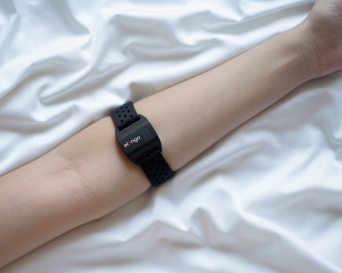
place the sensor on the inner forearm,
tighten the strap so it is firm but not constricting,
make sure the protective film is removed,
warm your hands briefly (improves perfusion).
The signal graph should be smooth, without long gaps or sharp spikes.
3) Minimize movement
Movement or muscle tension can disrupt:
optical sensing,
Bluetooth transmission.
During measurement:
remain completely still,
do not lie on the arm,
relax forearm muscles.
4) Check battery level
A low battery can cause interruptions.
If the sensor blinks red, it must be charged.
5) If the issue persists…
Quick Fix – Check list
try measuring with a different phone,
observe whether disconnections happen every time or only occasionally,
restart the sensor (turn off/on).
If disconnections occur regularly, please contact support.
We can check your data, evaluate the sensor condition, or guide further diagnostics.
4. When should you contact us?
Contact us if:
the sensor disconnects during every measurement,
the measurement cannot be completed even after adjusting the procedure,
Bluetooth is unstable even in ideal conditions,
you suspect a technical issue with the sensor.
We are happy to investigate and help resolve the situation.
Was this article helpful?
That’s Great!
Thank you for your feedback
Sorry! We couldn't be helpful
Thank you for your feedback
Feedback sent
We appreciate your effort and will try to fix the article